.svg)
Class Booking vs. Class Scheduling: What’s the Difference?
October 24, 2026

Written by
Aksh G
.svg)
Class booking vs class scheduling describes two halves of one system. See which side faces customers, which faces staff, and why studios need both.
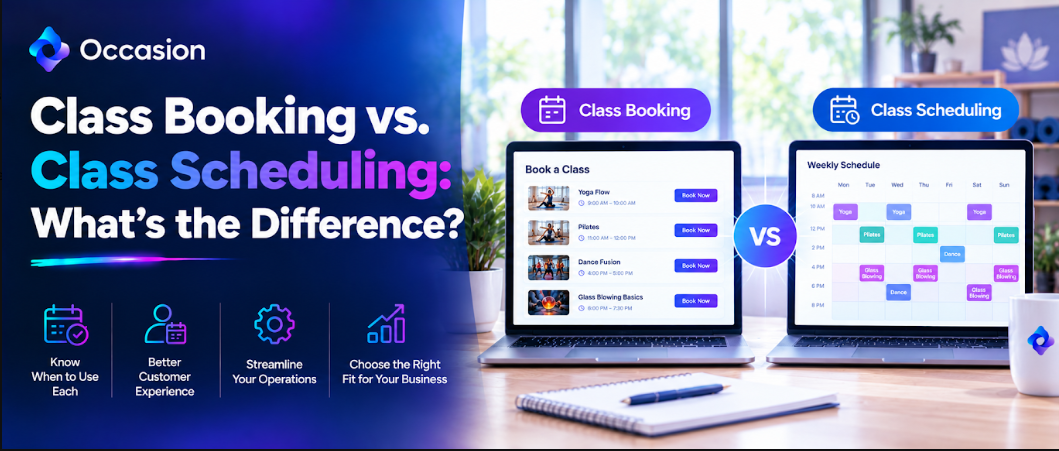
Class booking vs class scheduling describes two halves of the same system. Booking is what the customer does when they pick a class and pay. Scheduling is what the business does to set up that class, assign a room, staff it, and track who turns up. One faces outward, the other inward.
We built Occasion to handle both sides from one dashboard, for businesses running classes, workshops, camps and private events. About 8,000 sellers across 12 countries use the platform, from pottery studios and cooking schools to skating rinks and tour operators.
What is Class Booking Software and What It Handles
Class booking software is the part customers actually use. It displays available classes, takes bookings, collects payment, and sends a confirmation. Everything from browsing to receipt happens inside it, usually without anyone from the business getting involved.
The distinction from scheduling matters because software marketed as one often handles the other poorly. A booking tool with a weak calendar leaves staff working from printed sheets. A scheduling tool with clumsy checkout loses customers halfway through paying.
Why Class Booking Always Faces the Customer First
Booking covers everything a customer touches. It includes browsing available classes, choosing a date, entering details, paying, and receiving confirmation. It happens on a phone more often than a laptop, which is why Mobile-Friendly Class Booking Software matters so much.
The quality bar here is simple. Can somebody complete the whole thing in two minutes without creating an account or calling anybody. Every extra step costs bookings, especially for parents booking during a lunch break.
What Benefits Class Booking Software Gives a studio
The gains show up immediately in both revenue and admin time. Five benefits below explain why studios move away from phone bookings and spreadsheets, and each one removes work somebody currently does by hand every week.
- Bookings arrive overnight without anybody answering the phone
- Payment collects upfront, so no chasing unpaid places
- Waitlists refill canceled seats without staff involvement
- Confirmations and reminders send themselves automatically
- Customers book on a phone in about two minutes
What is Class Scheduling Software and What It Manages
Scheduling software manages the resources behind every class, including dates, capacity, instructors, rooms, and equipment. When considering What Is The Best Class Scheduling Software, it is important to look for tools that also handle venue setup, including physical spaces, virtual sessions, and mobile venues that travel to a customer location.
Why Class Scheduling Always Faces the Staff Side
Scheduling covers what happens behind the counter. It includes creating the listing, setting capacity, assigning an instructor, allocating a room, and blocking times when the space is unavailable. Customers never see any of it directly, which is exactly the point.
Good scheduling prevents problems customers would otherwise notice. Double-booked rooms, overbooked classes and instructors assigned to two places at once all come from weak scheduling rather than weak booking.
How One Live Calendar Ties Booking and Scheduling Together
The calendar is where booking and scheduling meet. A customer books, the roster updates, and the calendar reflects it immediately for every staff member with access. No one retypes anything, and nothing sits in two separate places, waiting to drift apart.
Everyone given access sees the same live view. That removes the familiar problem of one person holding the real schedule while everybody else works from a slightly outdated printed copy.
What a Class Roster Shows Staff Before the Door Opens
A roster shows who booked, who they booked for, what they ordered, and what they answered at checkout. If somebody bought seats for three people, those details would appear. Custom questions asked during booking show their answers alongside.
Staff can email or text the whole roster at once, or one customer individually, using saved replies for common messages. Check-in happens through a shareable link that works on any phone, no account needed.
Why Occasion is the Best Class Scheduling Software
The best platform is the one handling every part of a studio’s week without charging extra for any of it. Occasion does that by including every single feature on every plan, so a solo teacher and a busy three-room venue both get waitlists, rosters, digital check-in, and full venue management from day one.
- One live calendar every staff member sees updating instantly
- Two-way Google Calendar sync blocking personal commitments automatically
- Rooms configured inside physical, virtual, and even mobile venues
- Rosters filling themselves as customers book and pay online
- Shareable check-in link working on any phone without accounts
- Internal notes added to bookings for staff eyes only
- Cancellation policies published and agreed by customers at checkout
- Orders found, edited, moved or refunded in several clicks
Which Scheduling Tools Separate Strong Platforms from Weak Ones
Occasion gives a team one live calendar everyone sees, rooms set up inside venues, internal notes visible only to staff, two way Google sync and a shareable check in link needing no account at all. Orders can be found, edited, moved to another date or refunded without ever cancelling and rebooking anything manually.
Why Two-Way Google Sync Prevents Double Booking
Two-way Google Calendar sync means bookings flow into a personal calendar and personal commitments block time in the booking system. An instructor marking a dentist appointment prevents a class from being scheduled over it automatically.
That two way flow is what separates proper scheduling from a one-direction export. Without it, somebody always has to remember to update the second calendar manually, and eventually somebody forgets.
Which Booking and Scheduling Features to Test First
Test whether a multi week series builds cleanly, whether phone and desk bookings land in the same calendar, and whether an order can move to a different date without canceling and rebooking. Those three answer most questions quickly.
The Best Class Booking Software for Your Business will also let you change any order in a few clicks, including adding a seat, refunding to card or credit, or moving somebody to a different event entirely.
Why Studios Run Both Booking and Scheduling on Occasion
Booking and scheduling sit in one dashboard rather than two connected tools. Occasion includes every feature on every plan, so rosters, check in, waivers, venue management and automated emails come as standard. A thirty-day free trial carries no setup fee.
Conclusion
Class booking vs class scheduling is not a choice between two products. Booking brings customers in, and scheduling keeps operations running smoothly. Choose the best class booking software for your business by testing both sides properly before committing. Occasion handles each from one screen.
FAQ
Does class booking software replace taking bookings by phone?
Mostly. Most customers prefer booking online, though good software still lets staff add phone and walk-in bookings into the same calendar.
Can class booking software fill canceled seats automatically?
Yes, through waitlists. Customers subscribe to a full class and get notified the moment a space opens, so seats refill without any phone calls.
Keep reading



Occasion’s mission is to empower those who build happier communities.